|
 Pocket GPS POI-Sync is a new service from the
Pocket GPS Team. Pocket GPS POI-Sync is a new service from the
Pocket GPS Team.
This incorporates all of the POI's listed at Pocket GPS,
categorised into country sets, which you can download and sync to your Pocket PC
in the desktop cradle whilst you're online.
Pocket GPS POI-Sync will work
with GPSAssist, POI-Warner, CheckPOInt and many more add-on POI programs using a
desktop application called POI-Edit.
*** Experiencing Connection Problems with POI-Edit ? ***
Click here and follow the configuration in our FAQ Page.
Download POI-Edit
To start you need to download POI-Edit which is a
PC based application. We've decided to provide a direct link to the author
as it's easier for him to update and maintain. To download, goto the
following URL http://www.dnote.nl/pda/poi/PoiEdit/ and select the Download link just under
the screenshot.
Installing POI-Edit
Install POI-Edit by running the downloaded
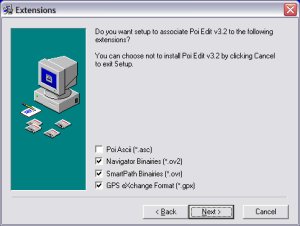
program. Install to the default location. When you are prompted on
install to select the extension types (as below in the first screenshot), just
select Navigator Binaries (*.ov2), and then click NEXT. When you
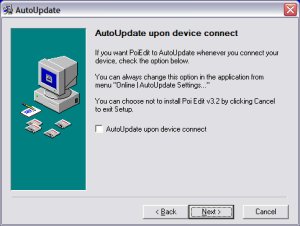
get to the next screen that says AutoUpdate upon device connect uncheck
the AutoUpdate box. The reason for this is our POI's do not update
on a very frequent (eg daily) basis, but usually on a monthly basis, so if you
do check this box, all you'll keep receiving is a dialog at the end of syncing
your Pocket PC saying no updates which can get a little frustrating and it also
puts a load on our server.

Once finished, you should now have a program group
on your PC called POI Edit. In there will be a TomTom Poi Editor.
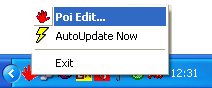
If you click the icon to run POI-Edit this will then run in your task tray like
this.
Now what we need to do is to run POI Edit by right
clicking on the icon in your task tray, then select Poi Edit.
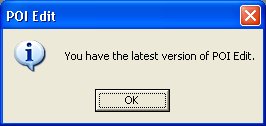
When running POI Edit it will run a check back to
the POI Edit web server to see if there is a new version there. If there
is, it will attempt to download it. If not, you will see a screenshot like
this.
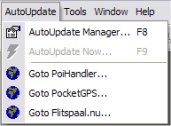
Now that POI Edit is running, click AutoUpdate
from the menu and then AutoUpdate Manager . What we first need to
do is setup POI Edit. This will open another screen. This screen
will eventually show all the POI's that you are syncing to your Pocket PC.
AutoUpdate Manager
First we need to make sure you are pointing to PocketGPSWorld.com for your POI's. If you are not, you will not see our collection of POI's. So in the screen below, make sure you click http://www.pocketgpsworld.com in the top left box, in the box below, click the country you want POI's for, if you are looking for UK POI's, then select United Kingdom.
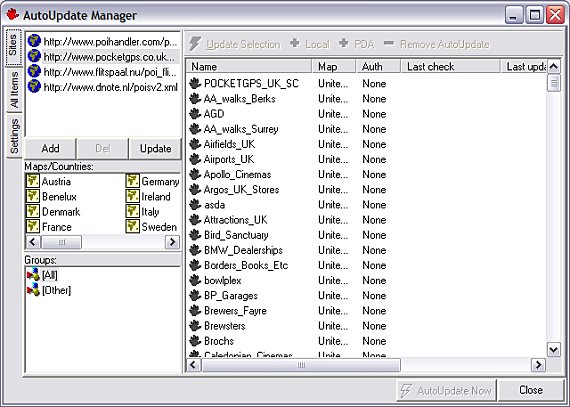
Also in the Groups box, click ALL groups and you should see a list of POI's for the country you have selected.
Transferring POI's to the Pocket PC
Highlight the POI's you want in the right hand window, and then click the  button. These will then be added for synchronisation. button. These will then be added for synchronisation.
Synchronising POI's
Now click the AutoUpdate Now button and you should now be prompted to save each OV2 file to the correct directory to where your TomTom Navigator maps are installed. This will usually be \Great_Britain Navigator Map\ on your relevant storage card, but this will differ depending on the country maps you are running. Click SAVE on each one.
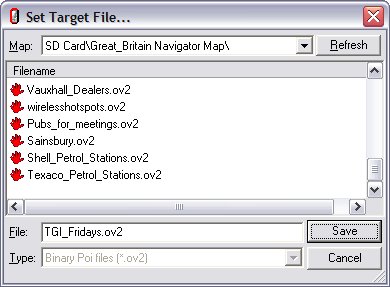
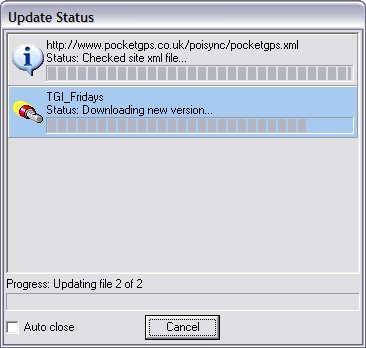
Once you have completed this on all of your POI's, you will see a transferring status window like below. Once completed your POI's will be synchronised to your Pocket PC and you can close this window.
How do I download updated POI's in the future ?
In future updates providing POI Edit is in the task
tray, just right click and select AutoUpdate Now and it will run the
update process.
If there are any updated POI's you will be prompted to update them.
Known Problems
If you believe there should be some updated POI's
on the Pocket GPS POI-Sync server because we've announced them on our news page
but you're not seeing them, it's because POI Edit caches the server list.
If this happens (and it's usually because you haven't logged out or switched
your machine off for a while, but put it into hibernate), then just exit POI
Edit in the task tray and re-run POI Edit and it will download a new index list
from our server.
If you experience any problems, send them to
dave@pocketgpsworld.com
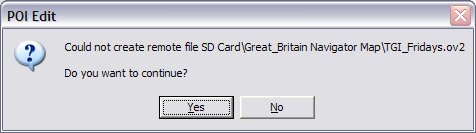
If you also see an error like the screen below, this means that either your Pocket PC isn't docked and ActiveSync does not have a live connection (green ActiveSync icon), or you are out of storage card space, or you are running a later version of ActiveSync (downgrade to v3.7 or below)
Frequently Asked Questions
Q. If I add entries to one of the POI's I've
downloaded, will it upload it back to the server ?
A. No. The reason for this is, you could
overwrite the a recent POI that has been uploaded, so you do have to email us an
updated POI file. What we would suggest is you save the POI as a different
name, so if you have Castles.ov2, then call it Castles2.ov2 and
email us the updated file.
Q. If I sync the Speed Camera Database, or any
POI's I want to be notified of, do I have to do anything else ?
A. Possibly. It depends on the add-on
utility you use on the Pocket PC. GPSAssist has it's own seperate database
so it can detect changes to the database. If applications have this, then
you may also have to sync within the application like GPSAssist to keep both the
OV2 and the POI Alert notification program up to date.
Q. Can I ask POI Edit to sync every time I dock my
Pocket PC ?
A. You can, but there really is no point to it.
If you dock your Pocket PC 5 times a day, you will need to download and sync 5
times a day and also answer quite a few dialog boxes that pop up. What we
recommend is you watch our news page, we'll update you when there are updates,
and then just select the Update Now option in POI Edit and it saves you having
to manually download the POI files.
Troubleshooting
If you are still experiencing problems connecting,
check out our FAQ
Database for assistance.
|