|
|
 |
 |
 |
 |
|
TomTom
Navigator 2 Preview |
Date
tba |
|
|
Review by
Dave Burrows
This preview is aimed at
existing TomTom Navigator 1 users. A complete TomTom Navigator 2 review
will be along shortly.
As many of you know I predicted a new version of TomTom Navigator (a successor)
for around June 2003 the latest. TomTom have been very hard at work with
TomTom Navigator 2 and have released it earlier than my prediction.
Now
something that you need to realise is that although TomTom Navigator 1 had it's
faults, it appears to have the market share in the UK and in some European
Countries, and certainly a high following from
Pocket GPS users. So with all it's shortcomings, it obviously is a very good
piece of software and one liked by thousands of people all across Europe and
with that in mind, how do you make a good piece of software better ?
|
POI
Data
In
the initial review of Navigator 1, our main complaint in our review
was the lack of POI data. It's really good to see that TomTom
and TeleAtlas have listened to our requests and this has
been addressed, and 21 new POI groups have been created in addition
to the existing groups in Navigator 1 which include:-
|
-
Amusement
Park
-
Beach
-
Camping
Ground
-
Car
Dealer
-
Car
Repair Facility
-
Cash
Dispencer
-
Company
-
Convention
Centre
-
Embassy
-
Mountain
Pass
-
Mountain
Peek
-
Museum
-
Nightlife
-
Opera
-
Park
And Recreation Area
-
Place
of Worship
-
Rent
Car Parking
-
Shop
-
Theatre
-
Tourist
Attraction
-
Yacht
Basin
|
|
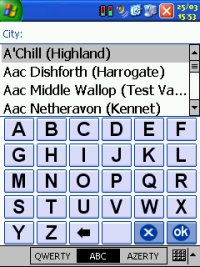
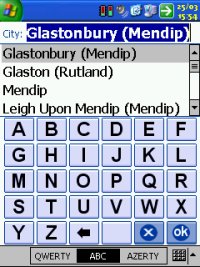
On
Screen Keyboard
Something some of you may remember us mentioning when TomTom
Navigator 1.50 came out. TomTom were working on a full screen
keyboard and this has now been incorporated into Navigator 2 with
support for ABCD, QWERTY or AZERTY layouts. This aids typing with nice
large key
buttons allowing you to use your finger rather than stylus.
Pocket
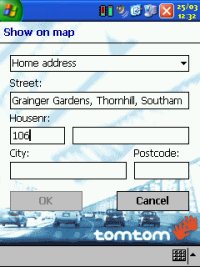
Outlook Integration
A
welcome feature for many will be the Pocket Outlook
integration. This initially took me a while to find, as you
don't see anything in TomTom Navigator 2. What you will see
however is if you run up Pocket Contacts, tap and hold a contact and
you'll see two new options. One option is Navigate To
which will then jump you straight back to Navigator 2 with the
correct information allowing you to modify or OK the data. The
second option is Show TomTom Map allowing you to see where
the contact is on the map. Both very good features, and it's
nice to see how well this has integrated into TomTom Navigator 2.
|
|
|
Postcode Routing
Postcode routing is enabled in TomTom
Navigator 2, but it's not what you might expect. When planning
a route using A to B, if you enter the city, then instead of
entering the street name, enter the first part of a postcode, eg
BH12. This will then jump to the first street name in
alphabetical order that has BH12 listed next to it. Now
although this is a good feature, it really should have been
implemented a little better in my opinion. The reason I say this is that
street names are sorted alphabetically, and postcodes are not so the next street name
could be a BH4 or a BH5. Unfortunately if you want to use
postcodes you have to still scroll down the complete list of roads
within the City which really doesn't make it easy.
|
3D
Map
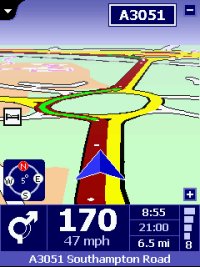
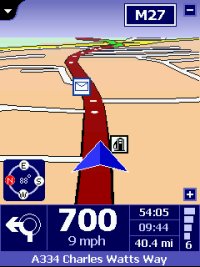
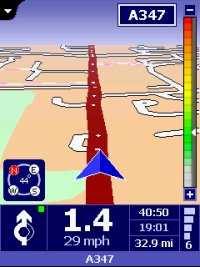
One of the hottest
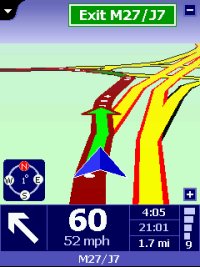
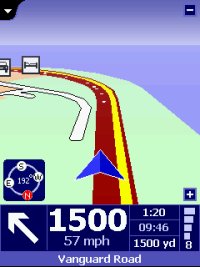
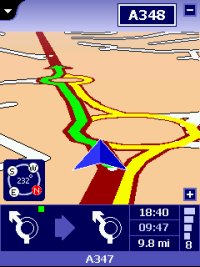
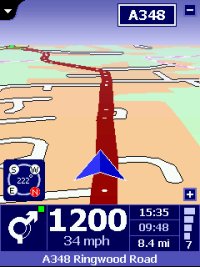
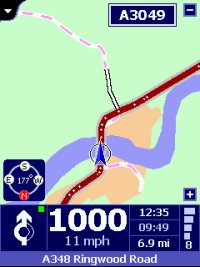
new features of TomTom Navigator 2 is the 3D map mode. The 3D
Map is incorporated into the Navigator screen, following on from
what we've seen in Destinator 2. The maps are clean, and very
colourful. Look at the horizon and sea on the third
screenshot!
 |
3D/2D Map Comparison
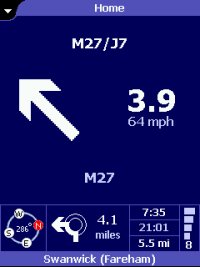
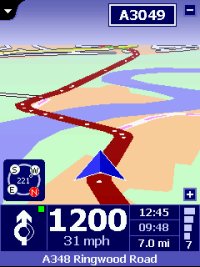
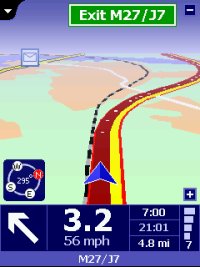
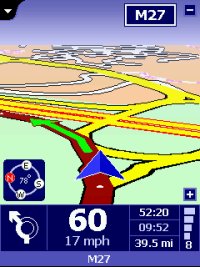
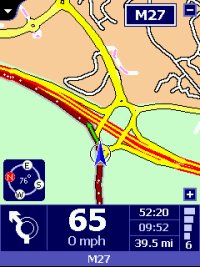
Here's
a couple of motorway screenshots to show what the difference between
the new 3D look and the conventional 2D look.
I
know half the Navigator users will like this feature, and I'm sure
there'll be equally the same amount that will think it a gimmick
like with Destinator 2's 3D view, but I must say I do like it.
The large pointer I think could be reduced in size a little.
It's fine for motorway driving, but when driving small town roads,
it does look way too large.
|
 |
 |
 |
|
3D Map
|
3D Map
|
3D Map
|
 |
 |
 |
|
2D Map |
2D Map |
2D Map |
London
Congestion Area
We're
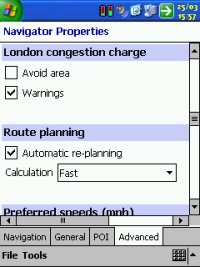
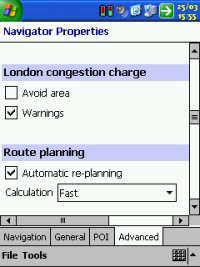
amazed to see this made it in, in time, but the London Congestion
Area has been added to TomTom Navigator 2 giving you two very neat
features. One to be warned that you are going to enter the
congestion area, and another feature to avoid the Congestion area
altogether. I have only been able to test this in Demo mode.
You will be warned if you try to plan a route into a congestion
charge zone. I have also tried the route around congestion
charge zone and this seems to work well providing your destination
isn't within the congestion zone
Memorize
Position
There's a new facility called
|

 |
|
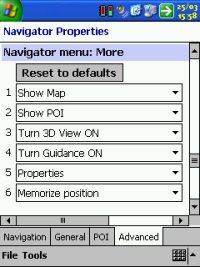
Memorize Position which allows for a quick favourite to be placed on
the map and in your favourites list by selecting this option. |
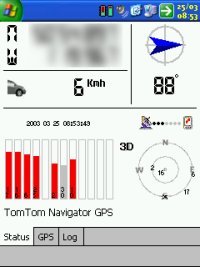
GPS
Status Screen/Drivers
The
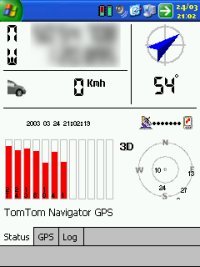
GPS Status screen looks just like it did in TomTom Navigator
1. It still has the standard Status screen, the GPS screen
where the driver resides and the LOG screen allowing you to record
and playback trips/logs.
There
has been more support added for GPS drivers, TomTom do not lock
their software to any specific GPS hardware so you will not have nay
issues here.
In
fact, TomTom have added extra support for Bluetooth GPS receivers as
there will be more coming available in the very near future.
|
|
Third Party
Application Support
I'm
really glad to say that I've tested the Pocket GPS Safety Camera
Database with TomTom Navigator 2, GPSAssist and POI-Warner and all
work like they did under TomTom Navigator 1.
This is great, as you never know with new software updates what
could happen.
So if you decide to upgrade from TomTom Navigator 1 to Navigator 2,
you won't even have to re-install your other applications!
|

 |
|
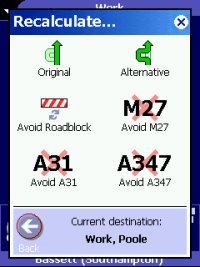
Alternative
Routing
TomTom
have now added a nice new feature called Alternative routing into
the Navigator screen
as
a button. This is like the option that TravRoute have offered
in CoPilot for a while now. When selecting this option you get
the facility to recalculate a route from Original, Alternative or
Avoid Roadblock. You also get the option of avoiding roads
that are planned into the route which is a superb feature!
Searchable
Places
One problem which Navigator 1 really fell short on for the GB
edition was the database of searchable places. People will
|
  |
|
remember places (very popular places at that) like Glastonbury could
not be searched for. We've taken an extensive look at these under Navigator 2 and most of these seem to now be in the database, so
hopefully peoples complaints in the forums haven't gone in vain.
TomTom do listen to constructive criticism. |
|
Database Problems Fixed
There are a lot of items that have
been fixed, but equally a lot that haven't. Most of the
database problems have been fixed in TomTom Navigator 2. The
following places we've checked and are now in the database
-
Shepton Mallet, Somerset
-
Wells, Somerset
-
Glastonbury, Somerset
-
Street, Somerset
-
Bideford, Devon
-
Ilfracombe, Devon
-
Newton Abbot, Devon
-
East Allington, South
Hams
-
Kingsbridge, West
Somerset
-
Salcombe, South Hams
-
Bodmin, North Cornwall
-
Bampton, Eden
-
Cheddar, Somerset
Bridges Fixed
-
Britannia and Menai bridges to Anglesey are also
fixed and you can route across these
-
M25 Exit 15 Northbound to M4 Exit 4B east bound, is
now resolved for routing
-
M4 Junction 10 routing from Wokingham to Slough is
now fixed
Database Problems still in TomTom
Navigator 2
-
Combe Martin, Devon
-
Totnes, Devon
-
Dartmouth
-
Dorchester, Dorset (still listed as Oxfordshire)
-
Wareham, Dorset (listed as Warham North Norfolk)
-
Mawgan Porth (think it's still a problem)
-
Newquay is still showing the wrong area of Cornwall
-
Fleet (Hants) shown as Fleet (Harts)
|
Upgrading
to TomTom Navigator 2
When
you have paid for and received your TomTom Navigator 2 CD, there
is no need to remove TomTom Navigator 1 from your Pocket PC, TomTom
Navigator 2 will not however co-exist on the same Pocket PC as TomTom
Navigator 1, but it will just overwrite it. So after
installing TomTom Navigator 2, you will not have access to TomTom
Navigator 1. When
installing the upgrade over the top of TomTom Navigator 1, you will
be asked to activate your copy with the supplied key. This
then locks the software to your Pocket PC. The license
agreement does state that you can use Navigator 2 on multiple
devices providing it's only installed once, so you will need to
contact TomTom if you upgrade your Pocket PC later or have a replacement Pocket PC
due to loss or damage.
It's a shame that activation has had to restrict people in this way,
as there are many genuine users out there that do not pirate the
software, but I suppose on the other hand, there are also plenty
that do pirate, and TomTom do have to look after their own
interests. Also when upgrading you will find that the new POI
groups aren't enabled. You will have to go in and manually
tick these. I also found the Safety Speed had changed to over
120mph so this is another option you may need to tweak back to
normality.
Planning Routes Offline
One thing that everyone has cried out
for is to be able to plan the route without having a GPS connected,
and then to drive that route using the Demo mode. Thankfully
TomTom have included this into TomTom Navigator 2 and it really is a
great feature!
Summary
As
you can see, TomTom have been hard at work, and I'm sure you'll
agree there's quite a few new features that have been requested in
our forums here, so TomTom have been listening to you all! The best of all
I would say is really the 3D view, London Congestion Charge Zone, Alternative Routing,
more POI data and newer maps! The Map/geodata is updated from TeleAtlas as of
December 2002 which provides a much richer set of data and a hugely
enhanced POI database which will hopefully
make TomTom Navigator 2 much more accurate.
|
|
|
 |
 |
 |
 |
|
|