SatNav GPS
Email Updates
Sign up now to our newsletter alerts (usually monthly).

Future speed camera database releases, hot topics, news and reviews.

Your privacy is important to us, we do not sell email details. Easily unsubscribe.

Enter Your Email

Navigate Our Site

MEMBERS AREA
Subscribe Now
Speed Camera Download
Submit Cameras
Free Competition
Member Discounts
Your Account
Member Forums

PUBLIC GPS FORUMS
Register to Post
Log in to Post
Private Messages
Your Account
Public GPS Forums
FORUMS BY BRAND
POINTS OF INTEREST
Free POIs
Submit POIs

REVIEWS & ARTICLES
Full Listing
[+] Apple
[+] Article
There is No Silver Bullet Accurate Traffic Information Requires Multiple Data Sources : Jul08

PocketGPSWorld.com Active Speed Camera Statistics : Jul08

Pocket GPS Terminology : Dec07

Galileo European GPS Constellation Gets Go Ahead : Nov07

A Day in The Life of a PocketGPSWorld.com Verifier : Nov07

Nikon D300 and D3 GPS enabled cameras : Nov07

The Ordnance Survey have 4 million POIs : Nov07

3,2,1 Liftoff... The latest GPS Satellite is successfully launched into orbit : Oct07

Mike's Muses: Diving with GPS? : Mar07

[+] Binatone
[+] Blaupunkt
[+] Brodit
[+] Carcomm
[+] CoPilot
[+] Destinator
[+] Directions Ltd
[+] Event
[+] Evermore
[+] Fugawi
[+] Garmin
[+] Globalsat
[+] Holux
[+] Intellinav
[+] Krusell
[+] Magellan
[+] Mapopolis
Mapopolis 4.71 review : Jun06

[+] Memory-Map
[+] Mio
[+] Nav N GO
[+] Navigon
[+] Navman
[+] Navteq
[+] Other
Tchart GPS Speed Sentry Review : Oct08

Nokia Navigator 6110 & ViewRanger : Sep08

ATP Photofinder Review : Sep08

Nextar launch the bilingual M3-MX SatNav : Sep08

AMOD AGL3080 Photo Logger review : Aug08

Letter Logger review : Aug08

ROADTOUR Satnav Tour Guide Review : Jun08

Subaru World Rally Team Points Of Interest POI : May08

Red Hen Blue2CAN for Nikon D3 and D300 GPS cameras review : Mar08

Sygic Drive 7 Review : Feb08

Pocket GPS UK Safety Camera Database - CheckPOInt : Jan08

Pocket GPS UK Safety Camera Database - POI-Warner : Jan08

Pocket GPS UK Safety Camera Database - Kenwood POI Loader : Jan08

World Tracker PLD review : Dec07

The GiSTEQ PhotoTrackr image tagging system review : Dec07

Hama UK Product Roundup : Oct07

WondeX BT-100Y Bluetooth GPS Receiver review : Oct07

WondeX BT-100Y Bluetooth GPS Receiver review : Oct07

HTC Advantage review : Aug07

eBonTek Bluetooth GPS Datalogger review : Aug07

Ultimateaddons Solar Backpack 50 Litre 2200mAh : Aug07

Z1 Solar Bluetooth GPS Data Logger Review : Mar07

Ontrak Position Tracking Device review : Feb07

Royal Digital BS4100 Bluetooth GPS receiver review : Nov06

GPS For Less - Ezipower Universal Charger system : Oct06

Hirschmann multi purpose antenna review : Sep06

Wintec WBT-100 Data Logger review : Jul06

World Tracker SMS review : Jan06

World Tracker GPRS review : Jan06

World Tracker Data Logger review : Dec05

TiBO PND review : Dec05

[+] Otterbox
[+] Qstarz
[+] Route66
[+] Royaltek
[+] Satmap
[+] TomTom
TomTom launch the GO940 Live SatNav in the UK : Nov08

TomTom GO 930 SatNav review : Sep08

TomTom Announce GO 940 LIVE Connected PND at IFA Berlin : Aug08

Carcomm x20/x30 Cradle CNM-167 Review : Aug08

TomTom - How to remove cameras Tutorial : Jul08

Speed Camera Voice Alert Downloads for Garmin and TomTom : Jun08

Customise your GPS/SatNav : May08

TomTom Navigator Custom Cursors : Apr08

Speed Camera Icons by GerryC : Feb08

Speed Camera Voice Alert Collections for TomTom and Route66 : Feb08

Speed Camera Voice Alert Collections for TomTom and Route66 : Feb08

TomTom GO 920T In-Depth Review : Jan08

Pocket GPS UK Safety Camera Database - TomTom Go/Rider/One - OV2 : Jan08

PocketGPSWorld Safety Camera Database - TOMTOM GO 910, x20 and x30 : Jan08

PocketGPSWorld Speed Camera Database - TOMTOM Navigator 5 & 6 : Jan08

TomTom NavCore 7.2 Device-Dependent Feature List : Oct07

TomTom Version 7 : Mapshare Moving a POI : Jun07

TomTom Version 7 : Map Share blocking/unblocking a road : Jun07

TomTom Bluetooth Remote Control Review : Jun07

TomTom Cannes Announcement report : Jun07

Publishing real time TomTom journey information on the internet : Oct06

TomTom One New Edition second thoughts : Oct06

TomTom Compatibility matrix for program builds and map versions : Sep06

TomTom One New Edition first thoughts : Aug06

Inside the TomTom GO 910 : Jul06

TomTom RIDER Review : Jan06

TomTom ONE Review : Jan06

TomTom 510 710 910 Overview : Jan06

TomTom RIDER Scooter Install : Jan06

[+] Trimble
[+] ViaMichelin
[+] Wonde Proud

GPS CENTRAL
About Pocket GPS
Contact Pocket GPS
Corporate Enquiries
Free GPS Downloads
GPS Events
GPS Event Blogs
GPS Related FAQs
GPS Reviews
News Archive
Report Piracy
Stolen GPS Register
Submit GPS News
Suggestion Box
Site Map

HELP
Registration Help
Subscription Help
Speed Cameras Help

SEARCH
Search GPS News
Search the GPS Forums
Google Pocket GPS Search
Pocket GPS
Web


Bookmark & Share!

Click Now to Bookmark and Share Pocket GPS! Click Now to Bookmark and Share Pocket GPS!

From real life to digital map: The Tele Atlas Mapping process

Date 25th May 2007

Article by Mike Barrett and Darren Griffin


Last week we were invited, along with a number of other journalists, to to a media day with Tele Atlas at Reading. This brought together a number of key personnel from Tele Atlas across Europe with some of their solution partners to highlight the state of the market and the where Tele Atlas is focusing their efforts at expanding and improving their mapping products and services.


We were treated to a mixture of formal presentations, informal chats with the solution providers, and a demonstration of the famous Tele Atlas mapping van.


It is a little ironic that I am currently testing a Garmin system at the moment which uses maps from a different supplier. So that was ditched in favour of a Tele Atlas system to direct me to the high-tech industrial park in Reading where the event was being staged.


I had my SatNav configured to pick up traffic information as traversing the M25 and M4 I was bound to get caught in traffic somewhere. Strangely in just over 100 miles there was just a small delay at the Dartford Crossing. I was directed to the swing barrier of the Regus offices by entering the postcode.


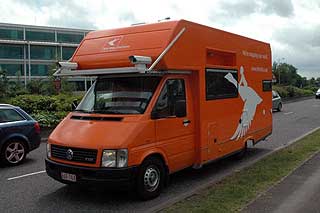
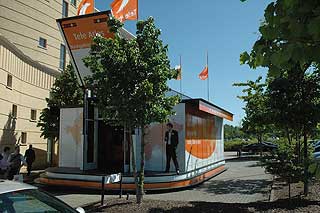
Sitting outside the office was a bright orange Tele Atlas mapping van complete with the Tele Atlas logo emblazoned on it's side. Just behind the mapping van was a huge articulated lorry which had it's sides extended to form a large mobile display area about 6m by 9m in size.


From real life to digital map: The Tele Atlas Mapping process

The Tele Atlas mapping van in action


From real life to digital map: The Tele Atlas Mapping process

The Tele Atlas mobile display unit.

I wont bore you with the stats and figures from the presentation, suffice to say that Tele Atlas and the market analysts are still seeing a significant growth in the navigation industry over the next few years.


The most interesting statistic presented was that the most significant sales sector is now the highstreet chains and auto retail stores. This far outstrips all other channels to market.


So now on to the interesting stuff: The Tele Atlas mapping process.


We were given a presentation of how the core data is collected, and the processes that are applied to create the mapping data. This culminated in us having a demonstration of the data collection process in the mapping van.


Tele Atlas have a large number of data partners around the world. Some providing a major core of data, whilst others provide just a few specific items. Different countries have different providers, in the UK one of the primary data providers is the Ordnance Survey, but Tele Atlas also obtain data from local councils, and other authorities. This information is then combined with the processed data collected from the mapping vans creating a digital map. Simple isn't it?


What are digital maps?

To you and me a traditional map is a series of lines and marked features on a sheet of paper. This does not need to be particularly accurate (in terms of road locations, paths or features) as long as they are sort of in the right place. (I will now duck while the professional cartographers amongst you throw things at me.) In the past this really has been the case. It is only since the advent of GPS and the use of digital mapping that the precise location of roads has become a critical issue.


A digital map on the other hand is nothing like a traditional map. To describe it simplistically it a series of points with a location. Each of these points may a relationship to other points. The links forming the relationships between the points have attributes associated with them such as speeds, road type, classification, restrictions, etc. From this it is just a matter of building up the database of points and connecting links to cover the local area, country, continent, and eventually the World.


A digital map will also have a number of different "layers" associated with it. These layers contain shapes and will define areas such as town limits, rivers, forests, lakes, shorelines etc.


To create a useable digital map all you need is a point at each intersection and at terminal points. The connecting links would just have the distance between points plus the other attributes. This is fine for a machine that doesn't need a graphical representation of the road, but us humans like to see bends, and often we don't understand numbers... To accommodate us intermediate points are added which provide a shape to the road. The more points included in the data the more "realistic" the visual representation of the map will be.


This last point is quite important as the solution providers (SatNav companies) are not able to use the full database and need to compress it to make the map size more suitable to portable devices. One easy way to do this is to drop some of the intermediate points. This results in the map looking a little angular, and of course not quite accurate. The navigation companies get round this by using a "snap to road" feature which will allow the current position display to be locked to the nearest road, rather than the actual position. Another method for reducing data size is "smoothing" the shapes of the city boundaries, rivers etc. Indeed one manufacturer has taken the decision to remove some of the rivers completely to save space.


The arguments behind saving space are mainly for storage costs, but this does seem a little unwarranted with the drop in price of flash memory. I would actually have thought that the opposite would be the case, with lower storage costs more detail can be included. Note that the compressing of the data has nothing to do with Tele Atlas, this is done by the solution provider when converting the database. This is also why the maps between different companies are not compatible with each other, despite originating from Tele Atlas.


Collecting the Map Data

So having looked at the data suppliers lets take a look at how Tele Atlas gather their own data. The Tele Atlas European operation is run from Gent in Belgium. They have 22 mobile mapping vans which are kitted out with some great technology to capture and georeference the World.


Tele Atlas have a number of different vehicles to survey the roads. The famous one is the orange mapping van, but they also use some much smaller cars to get into some of the smaller streets in the centre of cities.


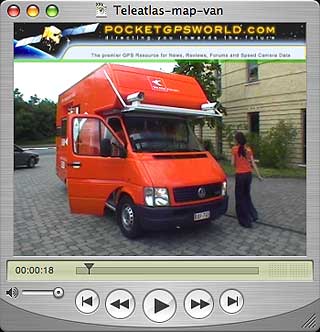
Click here for a short video showing the mapping van in action.


The mapping van that is used for most of the main surveying is a self-contained motor caravan (or RV if you are American) which has been modified to add the technology required to precisely digitise the country. Our demonstration mapping van was piloted by Belgians Stijn Ulenaers and Gudrun VanLaar, who, fortunately, are partners and live in the mapping van as well as work in it.


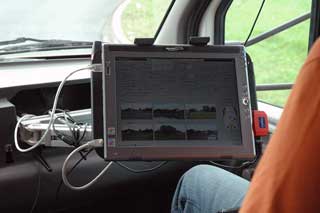
The mapping van has 2 computers that collect and store data, and up front on the passengers side is a tablet PC controlling the capture process. These are all networked together to complete the high tech mobile data collection system.


On the outside of the van are 6 digital cameras, as the mapping van is moving these are constantly snapping away taking pictures that have the GPS position embedded. These images are then saved to a pair of 250Gb hard disk drives.


The data capture rate is determined mainly by the weather conditions. On a bright sunny day the cameras can take pictures at speeds of up to 130KPH, but if the day is overcast or rainy the speeds are often dramatically reduced. To cope with the changing light the vans are scheduled to survey northern parts of the continent during the summer months and the southern areas during winter.


It takes about a week to fill a 250Gb disk drive. Once full one of the pair is sent to the Head office in Belgium by post. The other is saved as a backup in case of data corruption. If the disk arriving in Belgium is OK then surveying can continue. The captured data is then sent to the processing facility located in India. To date all the disks sent via mail have arrived safe and sound.


Although the vans are kitted out with GPS sometimes, as we all know, GPS doesn't work. A good example is when driving through tunnels. These obviously have to be mapped and mapped accurately so that underground junctions (such as in Basle, The Boston Big Dig, and the Limehouse Link) can be surveyed correctly. To accomplish this the van is fitted with sensors that can take over when the GPS signal has been lost. These measure distance traveled and turns, filling the gaps in the GPS tracklog.


Part of the management of the mapping vans is the planning of the areas to be surveyed. Numerous factors are taken into consideration such as the time of year, the known changes, the number of reported errors etc. This results in routes being created for the survey teams to drive. When looking at the vans in action the planned route is shown on the passenger's display as black lines, as the route is completed the black turns to green.


The operator of the tablet PC has 2 main responsibilities: providing navigation instructions to the driver, and checking the image quality that is being recorded. Stijn said that there were just two common problems: insects and picture contrast. Sometimes you have to scrape flies off the lens he explained.


The mapping van also has a fully fitted kitchen, sleeping quarters and washing facilities. This makes the van completely self contained eliminating the need to find lodgings, or even a camp site for the night.


Stijn and Gudrun along with the other 21 vans cover just under 2 million miles a year across Europe gathering the data that is improving the digital maps year on year. Allan Rasmussen of Tele Atlas says that around 20% of the map data is changed each year. Some of this is will be new developments and roads, whilst others will be a reclassification of road type, or change to one way street etc.


Once the data arrives in India there is a team of 800 operators who compare the images and tracks to the current mapping data extracting and referencing new information as it is located. This has resulted in the inclusion of signpost data in the mapping products which allow the solution providers to not only identify the road name, but also replicate the junction signpost in the navigation solution.


All of this information is consolidated into the master database. The master database is released to solution providers and mapping partners four times a year for inclusion in their latest products.


After taking in all this information we headed off home. This time it wasn't the simple straight motorway trip as there were 5 major incidents on the main roads. Fortunately I had my TMC enabled SatNav which routed me round the jams on pleasant country roads, even so it still took more than an hour extra for me to get home...

Click here to see a Tele Atlas mapping van in action

A short video showing the mapping van in action
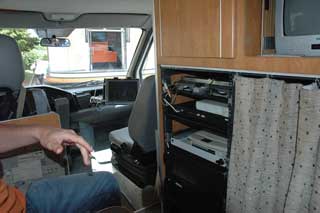


From real life to digital map: The Tele Atlas Mapping process The technology hub in the mapping van


From real life to digital map: The Tele Atlas Mapping process

Big brother is watching you...

Six cameras are mounted on the van
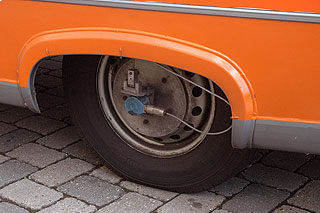


From real life to digital map: The Tele Atlas Mapping process

Sensors to compensate for the loss of GPS signal in tunnels
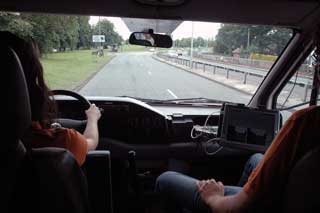


From real life to digital map: The Tele Atlas Mapping process

Surveying the roads around Reading


From real life to digital map: The Tele Atlas Mapping process

The tablet PC showing the images from the six onboard cameras.


Conclusion

I don't envy Tele Atlas with the mammoth job of mapping every single street in the World. They have one of those never ending tasks that will never be completed. Consolidating and verifying data from 50,000 suppliers into a single product is an almost impossibility.


They acknowledge that it is impossible to have 100% accurate digital maps, but they are striving to achieve the closest possible level of coverage.

References

Manufacturers Website

www.teleatlas.com

Pocket GPS Contributor

Mike Barrett

Pocket GPS Contributor Website

www.Pocketgpsworld.com

   
Resources  


Comments ?

Have any comments about this review ? Post them here.

Ads by Pocket GPS


Sat Nav
UK’s Cheapest TomTom Garmin HTC etc. Next Day Delivery Available
Handtec.co.uk/Sale


Evermore GT-800
EverPhoto on Google Earth and Google Map for data logging and navigation
EvermoreGPS.com

TomTom ONE XL
Specialists in refurbished Sat Nav & GPS like TomTom ONE XL for £117.49
TotalPDA.co.uk/ONE-XL

ProClip Car Mounts
Need a safe mount for your hand held device? Order a ProClip, clips on in seconds
ProClipUSA.com

Upgrade Garmin!
Click Here for 5 Superb Ideas for Garmin SatNavs. Free trial downloads!
Roadtour.co.uk


Advertise Here Now!
70 million totally targeted page views of your advert over a full 12 month period
PocketGPSWorld.com


Google Search

Google

Web
Pocket GPS