 Review by Darren Griffin Review by Darren Griffin
Introduction
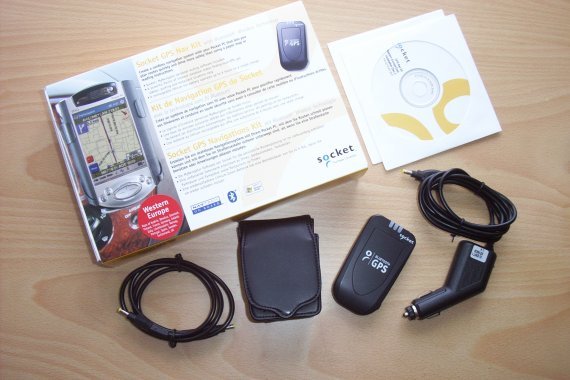
Socket Communications will be a familiar name to regular readers of PocketGPSWorld.Com and indeed PC users in general. Socket Communications produce a range of products for Windows powered handheld computers including Bluetooth cards, wireless LAN and modems they are better known in the GPS arena for their Bluetooth GPS receiver.
Now Socket is entering the European handheld navigation arena with a new GPS package that bundles their Bluetooth GPS together with MyNavigator, Socket's PDA Navigation application. Developed by Netropa, this product has been available in the US in many different disguises for some time now including Deluo Routis.
As the Bluetooth GPS has been reviewed previously (See http://www.pocketgpsworld.com/emtac.php ) we will concentrate on the application here.
Installation
Pop in the supplied CD and the application installer auto starts and installs the Map Loader application. The first major and important difference here is that as well as installing the Pocket PC MyNavigator application it also installs a PC version of MyNavigator which I shall come to later.
With the map loader running you are presented with the following screen. From here you can choose which maps you wish to install and the destination which can be Pocket PC Main or Storage Card memory or alternatively a folder on your PC/Laptop.
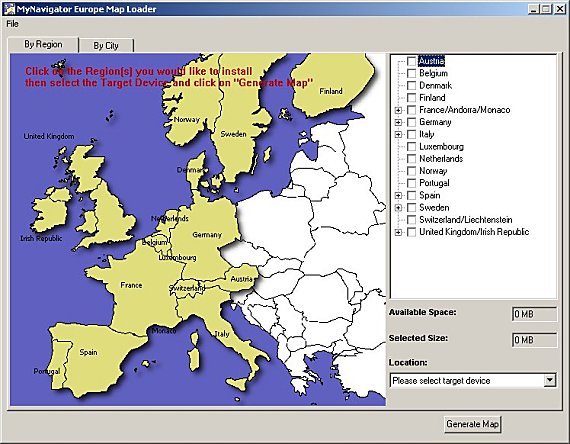
The maps themselves are produced by NAVTEQ and are rather larger than we are used to, the full UK plus Eire map set for instance will consume 175MB. A useful addition is the option to alternatively choose a city and set a radius around it, this will then define a custom map set which you can download as an alternative.
A word of caution here, the MyNavigator Pocket PC application requires at least as much free program memory available as the size of the installed map in order to run properly. This is fine if you have a single region of say 25Mb installed but it's a huge problem if you have loaded two or more map sets. Socket are aware of this problem and will hopefully produce a fix but in the meantime it is prudent to install the maps and the application itself to a storage card to maximise the amount of free program space available.
Map Installation
Using the Map Loader application you can easily select which maps you wish to copy to your Pocket PC. MyNavigator is particularly strong in this area. Unlike many of its competitors who restrict you to pre-defined country or regional maps, MyNavigator allows you (storage space permitting) to install either whole country or regional maps or to specify a town or city and define a radius of up to 60 miles for a custom map.
The Maps created can be installed onto the Pocket PC (into main memory or on a storage card), or directly into a folder on your PC or indeed a storage card reader. Unless you enjoy the torture of watching a 150MB file crawl across ActiveSync then you would be strongly advised to invest in an inexpensive memory card reader!
Normally the knowledge that NAVTEQ were the data providers would suggest the most current map data but sadly this is not the case here. Comparison with another package that uses NAVTEQ data reveal that the map data here is older and is missing a number of new road features, roundabouts etc that appear in the other software.
 GPS Configuration GPS Configuration
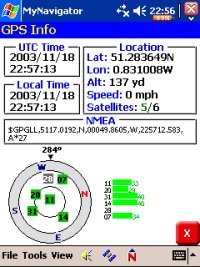
Start the application and once you have OK'd the annoying "Warning" screen which appears every time you launch, MyNavigator defaults to NMEA 4800 on COM1.
This is fine if you are using a serial GPS but as this bundle comes complete with a Bluetooth unit you need to set the COM port and baud rate manually which was quick and simple.
The GPS section provides all the usual information you would expect including UTC and Local times, Latitude, Longitude, Altitude and Speed. As well as a display indicating the satellites in view and their individual signal strengths there is also a small window displaying the real time data stream from the GPS receiver.
All this data is useful but it is not always apparent whether a fix has been achieved although the data stream does at least confirm connection with the receiver.
Route Planning
As is now common, MyNavigator assumes your current GPS location is your start point when calculating a route. Those who like to prepare in advance can still do so from the comfort of their armchair by using tap and hold on the map to bring up a menu which allows the setting of start and destination locations.
Tap the on screen "Menu" button and you will be presented with the main menu. Here you can enter your destination address, set options such as route calculation preferences and change volume and other options.
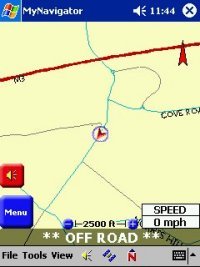 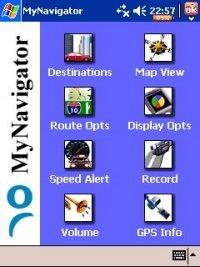
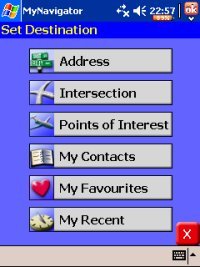
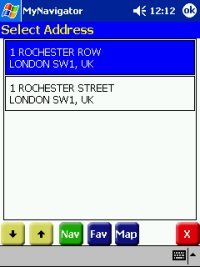
Selecting "Destination" presents you with the first screen below. This gives you a number of options including navigating to favourite destination, a pre-defined POI or any of the last ten destinations. Choose "Address" and you get a further option to search by street or city which is a great feature. A problem common to these applications is that whilst you may know the street name, often it is not indexed under the town or city that you would think it should be in! Using street search presents you with all the matches and gets around this problem.
 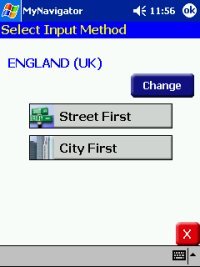
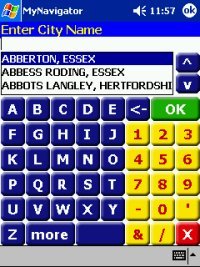
MyNavigator includes a "finger" keyboard to simplify address entry so having entered your chosen town and road you will be presented with a range of house numbers for that address to further refine the navigation (useful if your destination is a 2 mile long road!). The final step is to select navigation mode or choose the address if there were multiple search results.
In Use
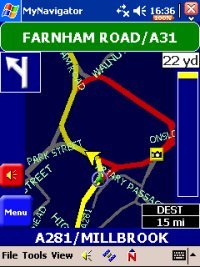
Once you set off, MyNavigator presents you with the necessary information. The female guidance voice is clear and loud and turns are announced in good time. Although text to speech is not employed here (and personally I find most of them dire anyway!) there is a good range of spoken prompts covering all eventualities. For those whom prefer to navigate without the voice instructions she can be silenced either using the icon in the navigation window or via the volume menu.
The map itself can be zoomed in or out using the - / + icons but you are not advised to attempt this whilst driving as they are far too small. Additionally an Icon on the task bar allows selection of Head-Up or North-Up map display modes.
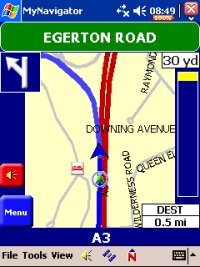 As a turn approaches MyNavigator provides additional information on-screen including the name of the street you will be turning into and a vertical bar on the right of the display that rises as the turn approaches. There is no facility for an instruction only screen without the map display which is a surprising omission given the safety warning each time you launch the application. As a turn approaches MyNavigator provides additional information on-screen including the name of the street you will be turning into and a vertical bar on the right of the display that rises as the turn approaches. There is no facility for an instruction only screen without the map display which is a surprising omission given the safety warning each time you launch the application.
Should you wander off the chosen route MyNavigator re-calculates very quickly. Initially it appears to attempt to guide you back onto the original route. If you ignore this it will eventually re-calculate the route from your current location. Once under way if you find your route blocked by traffic etc then you can call up the destination menu and choose a detour.
I did not experience any major problems with the routing algorithm, the routes were generally consistent with other applications but the default options did on occasion favour obscure routes on some of the short test journeys. Although these were more direct on the map they resulted in slower albeit pleasant drives along very narrow country roads!
Using its Almanac, MyNavigator calculates sunset and sunrise and automatically switched the map between day and night mode. This worked well, selecting Almanac from the task bar also provides information on local sunrise and sunset times as well as moon phase!
 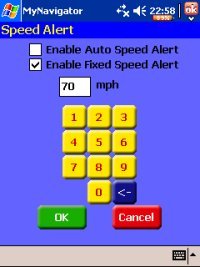
One other option I have not covered is Speed Alert (above right). This allows you to configure a sound alert which plays when you exceed a pre-configured fixed speed or on automatic, a speed setting based on the current road classification. Whilst the manual alert worked the automatic setting was erratic and could not be relied on to alert at the correct speed.
Likes
- The Voice Commands. The female speaker has a lovely Irish lilt to her voice!
- Auto Night Colour Mode
- Clear on-screen indication of current street and next maneuver.
Dislikes
- Safety Warning at program start, once at installation would be OK but every time you launch the application?
- Accessing some features and inputting destination takes too many screen taps
- Current Speed, ETA, time to destination and distance to destination cannot be viewed at same time
- Zoom controls are too small - use rocker pad instead
- No user customisation is possible
- Lack of Text Only Option instead of map whilst driving
- The Application is Memory hungry. This is a big problem and needs to be resolved urgently.
Summary
I was left a little confused when composing the summary. MyNavigator has some great features and is simple and relatively straightforward to use. It's not as configurable as other programs and although for some this may be a benefit I found it restricting and did not find it excelled in any area. Entering destinations required an excessive number of menus and sub menus and there is no provision for custom POIs.
The maps themselves are not the prettiest, there is no water data included so you won't see the paths of rivers or lakes on screen nor do railways appear.
On the positive side, map data for the whole of Europe is a great benefit. Many users are not interested in twiddling with a thousand and one settings and want a system that is simple to install, requires little configuration and does what it should do, navigate! MyNavigator does all this and does it perfectly well. Had this product appeared 12 months ago it would be leading the pack. The simple fact is that it has been overtaken by many better and more advanced solutions today.
|