|
|
 |
 |
 |
 |
|
Morpheous Road
Pilot Review |
4th April 2003 |
|
|
Article by
Dave Burrows
Morpheous have been well known for their speed
camera detectors for quite some time now, and
|

|
|
recently Morpheous have taken this a stretch
further for the standard Road Warrior drivers (aka engineers and sales fleets)
and created an all singing and all dancing product called the Road Pilot.
We have the full review here. |
|
I've been thinking of various ways on
how to open the review, and I keep coming back to the same sentence.
This device is ground breaking, it's truly remarkable, it has
everything a swiss army knife has in a knife, but in a GPS product.
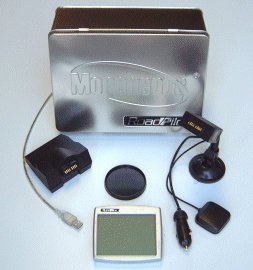
Taking the Road Pilot out of the box, I
saw a nice large gray scale screen which can be attached by a magnetic
grip to the suction mount. Everything I see on the Road Pilot is
revolutionary, the screen is so thin, it's about the depth of a palm
pilot, but there's no speakers on it ? I checked the literature,
sure enough it says voice notification, I take another look, and the
speakers are on the windscreen suction mount! Who'd have thought
of this ?
After taking the Road Pilot out of the
box, the first thing on my list was to update to the latest firmware. After all this is a speed camera detector, so you need the latest
database. Connecting this to the PC via the supplied USB cradle
was quick and easy, downloading the update over the internet was simplicity.
Absolutely no problems whatsoever to report here. |
|
|
So what does the Road Pilot do ?
The Road Pilot as I've already mentioned
is a Speed Camera Warning System. Not only does it detect for
the latest GATSO's, but the literature says it detects ALL speed cameras.
The Road Pilot has also some unique
features that aren't on other GPS detection devices. For
instance it has information about collision hotspots (frequent
accident locations) which are user selectable, Road Pilot also alerts
you if you're driving past a school. Don't forget that the
government has enforced the use of lower speed limits and higher fines
when speeding past schools or surrounding roads, this option is also
user selectable. All of these options allow you to configure the
Road Pilot. If you don't want to be notified, turn it off, it's
that simple!
The Road Pilot isn't just a Speed
Warning System, it also has a GPS status screen showing a map of the
world showing where each satellite is, and the individual satellite
strength which is something you would see on a normal GPS system, but
not on a Speed Warning System.
Road Pilot also gives you the options of
plotting your own waypoints, and being notified of these when you're
close to them. You also have a GPS Track screen so you can see
where your route has taken you, a trip computer showing how many miles
you have travelled, a detailed Mileage screen showing business
mileage, private mileage, commuting mileage and total mileage.
A large compass is available on screen,
a range pointer showing the range and direction to the nearest warning
camera or waypoint, separate voice notification for cameras and
waypoints, a very large speedo
It strikes me from what I see in the
Road Pilot, that Morpheous have tried to take a Garmin handheld GPS
receiver with track information, compass, pair this up with a full
speed camera warning system, and on-board computer for the business
traveller allowing them to keep track of their mileage and much more.
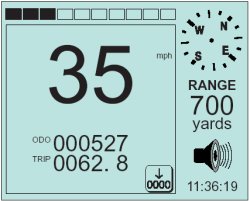
You'll see from the screens on the right
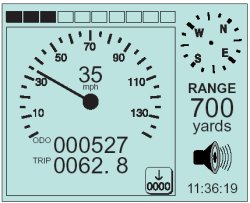
Fig 1 gives you the speed read out, total mileage and trip
computer with the option of resetting this to zero (with the 0000
button). The compass shows top right with the range to the next
camera and also the current time.
Fig 2 shows the full GPS
information with Latitude and Longitude, Heading, Speed, Height, GPS
fix mode (eg 2D or 3D fix), accuracy of GPS and the date and time
taken from atomic clocks in the satellites, again with a compass and
range distance.
Fig 3 shows the GPS Tracks
showing you exactly where your routes have taken you.
Unfortunately there are no base maps supplied with the Road Pilot or
optional, but it does give you a good indication that you've driven in
the right direction, and comes with full zoom in and zoom out
features. Incidently the top bars are the warning bars you'll
see filled when you approach a camera or waypoint.
Fig 4 shows the main Road Pilot
menu. This has icons along the top which are large enough for
your fingers to press without pressing the wrong feature. From
left to right is the GPS status screen, Speedo/General info screen (Fig
1), GPS Track Screen (Fig 3), GPS Information screen (Fig
2), and Warning screen (Fig 4). The Warning screen
allows you to set a new speed camera warning (left icon), or a new way
point (right icon). The bottom options from left to right are
Setup Screen 1, Setup Screen 2 and Exit.
The theme on all the Road Pilot screens
is to give you as much information as possible whilst giving you all
of the available options. |
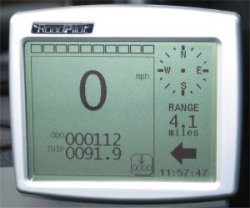
Fig 1
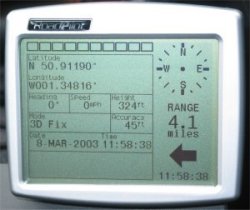
Fig 2
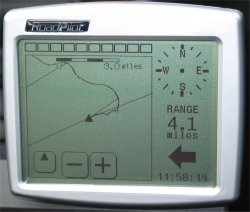
Fig 3
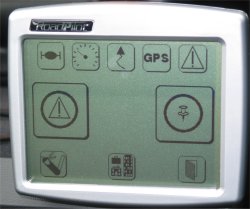
Fig 4
|
|
Configuration
One
thing that is very important in all devices is how far can you configure it ?
Morpheous have made configuration painless and straight forward. Online
help guides you through each menu option telling you exactly what the feature
does and what happens if you enable it or disable it, so no need to resort to
the manual! Actually the online help within the Road Pilot is so good, no
paper manual was included apart from a brief introduction sheet showing the various
screens we've covered above.
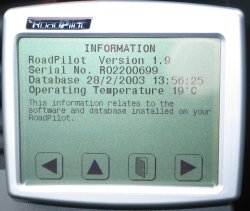
Quite
an impressive set of features are listed below that can be enabled and disabled. You can
also check the current Road Pilot firmware version, serial number, database and
operating temperature of the Road Pilot. Really Morpheous have thought of
everything with this little device!
|
 |
|
The Road Pilot includes:-
-
Ability to set volume of audible notification
-
Ability to set contrast for the screen
-
Selection of MPH or KPH for speed readouts
-
Analog or digital speedo
-
Ability to enable or disable voice notification which will give beeps instead
-
Set
time and the ability to select country and whether you are in daylight savings
time
-
Option of selecting the language to be displayed on screen
-
Enabling or disabling of the Mileage Manager
-
Setting of Mileage Data Length (allowing for oldest data to be overwritten)
-
Ability to set warning distance on Speed Cameras and Waypoints
-
Ability to enable warning of directional cameras/waypoints if cameras are on
other side of road
-
Ability to enable display of directional cameras/waypoints if cameras are on
other side of road
-
Auto
Ranging changing the range distance for notification depending on speed you
are travelling at
-
Speed
Sensitivity allowing you not to be notified of cameras if you are below the
correct speed limit
-
Ability to set Early Warning gives you an extra audible warning when entering
range
-
Early
Warning Speed Sensitivity allowing to be warned early if you are exceeding
speed limit!
|
|
Speed Camera Detection
The
Road Pilot really is an enhanced version of the Geodesy with touch screen.
We decided to throw the Road Pilot at our usual test routes for Speed Cameras
which include fixed based GATSO's and we're pleased to say that the Road Pilot
picked up all of these without fail. When configuring the Road Pilot to
see cameras on the other side of the road, and also in nearby roads, we found
clusters of Speed Cameras on adjacent roads which we haven't seen before.
This feature is a good one as it gives you more knowledge about the Speed
Cameras in the surrounding area. One thing I really like about the Road
Pilot is that it shows the correct speed limit against each camera, so if you
suddenly come up against a warning that a camera is close by, and you're not too
sure of the speed limit, then the Road Pilot will tell you.
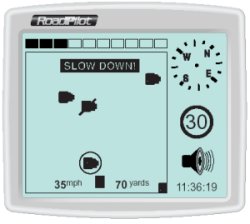
The
visual notification will show a GATSO sign on screen like the one on the right
and it will then give a verbal notification
|
|
| of the speed
camera you are approaching with a recorded voice saying "Speed Camera
Ahead", "Speed Zone". |
|
Standard Speed Screens
The standard screens you will see are
shown above. You'll see the standard speed in digital or
analogue format, with compass and range to to the next speed camera.
The black bars above each of the speed displays shows the proximity to
the next camera.
 |
Updating And Database Information
Road Pilot is provided with a desktop USB interface which enables you
to access the full Morpheous database which is updated on a regular
basis. Free updates are included for the first 12 months after
which the charge is £50 inc VAT a year. The database is updated
twice daily and covers England, Scotland and Wales with the following
data:
- Speed Cameras - UK, Holland & Belgium upgrade
available, Germany (coming soon).
- Collision Hotspots - UK
- Schools - UK (coming soon)
- Low Bridges - UK (optional)
- Red Light Cameras - UK (optional)
- Common 'Hand Held' Camera Sites - UK
Key
Features of the Road Pilot
-
Large
touch screen LCD for ease of use
-
Second
generation GPS for extreme accuracy.
-
Collision
hotspot warnings (user selectable).
-
Locates
all speed cameras.
-
School
safety alerts (user selectable).
-
Revolutionary RADAR Anti false alarming with RADAR option.
-
Uses USB
interface as standard, using Internet to update
-
Modem
Interface / Serial Interface and GPRS interface options.
|
|
Problems Found
Being
used to Pocket PC screens for over 5 years now, I've been accustomed to the
bright white displays giving great contrast in car. One thing I found with
the Road Pilot screen, although it had a green backlight that lit up, this could
only be seen after dusk, and although you could change the contrast on screen, I
found sometimes the Road Pilot was difficult to read especially in bright
sunlight. For the retail price, or a
little more, I think a colour screen could be added to it to give you the best
display available. Battery life isn't an issue as this needs to be permanently
plugged into the accessory socket, cost and size perhaps really is the only
restriction here. The Accessory socket plug I found to be a little too
springy, and wouldn't stay connected for more than 30 seconds in both of my
accessory sockets. I managed to get around this by plugging it into a
4-way extension lead, but this really shouldn't be required.
I also
had some issues with the active antenna that is supplied pre-wired to the Road
Pilot. There's no way of removing this. Most car windscreens will
allow GPS signals to travel through, and seeing that the Road Pilot does come
built into a windscreen suction mount, I would have hoped that this antenna
would be unpluggable to reduce the amount of wires on the dashboard, but sadly
not. The problems I experienced with the Active Antenna were that when it
antenna was placed on the dashboard in car created a swamp effect and knocked
out the GPS signals on my other 4 GPS receivers, immediately switching the Road
Pilot off rectified this, or by moving the active antenna onto the roof also
resolved this. This happens with other active antennas supplied with
Re-Radiating antennas, so this didn't really surprise me too much, but was a
minor annoyance until I worked out what was happening and how to resolve it.
|
|
Congestion Charge Zone Update
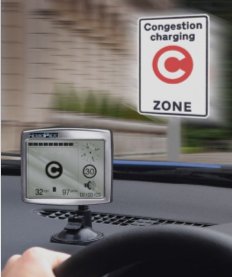
Morpheous have now
released a new firmware version which has a number of improvements and
enhancements, which are available now. They are free and will be included
automatically within Road Pilots on the next download.
-
London Congestion
Charge Zone
-
Warning are given
between 0700 and 1830
-
Warnings are not given
at Weekends
-
RoadPilot will warn:
- Approaching the CC Zone
- On the boundary of the CC Zone
- When in the CC Zone
-
Warnings of speed
cameras take priority over CC Zone
-
Other enhancements
include:
- Demo mode is now temporary, Road Pilot automatically returns to normal mode
after powered down.
- You can now cancel the saving and deletion of waypoints.
|
|
|
Summary
Overall
though, even with the problems experienced, I found the Road Pilot extremely
useful, and a great tool. For anyone that's travelling 100+ miles a day,
you will certainly find this useful, not only because you have a full GPS Speed
Camera Detection System (SDS), but you also have a complete mileage manager,
waypoint and GPS Track system built into it. Road Pilot is a sure winner
in providing the amount of technical information it does to the driver, but it
does come in at a higher price of £499. If you compare it to the average
GPS Speed Camera Detection Systems or Radar Detectors which retail at around
£350-400 then the Road Pilot is around £100-150 more expensive, but it is packed
with a lot of features!
If
you're interested in a complete system, you really can't go wrong with the Road
Pilot.
|
|
|
 |
 |
 |
 |
|
|