|
|
 |
 |
 |
 |
| Evermore GT-800BT Bluetooth GPS EverPhoto review |
Date 29th August 2007
|
The EverMore EverPhoto is a great concept, take a GPS, and a digital camera, merge the technologies and get images with positional information. No longer do you have to rack your brains to try and work out where you took a particular photo, let the technology do that for you!
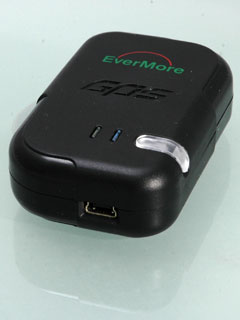
I have known EverMore for some time now. Their main markets are in Marine GPS, but they have also been strong in Bluetooth GPS devices and dataloggers. Their latest device the GT-800BT is a multi-purpose GPS system designed to be both a GPS datalogger and a Bluetooth GPS receiver at the same time.
You record your tracks, take your photos and when you get home the PhotoLogr software matches the two up and displays the results on Google Earth, or even creates a web site with links to Google Earth allowing you to share your pictures with your friends.
Read on to find out how the Evermore EverPhoto system worked in our field tests... |
Review by Mike Barrett
|
Features and Specifications
These details have been provided by the official data on the EverMore Technology website.
Features
•Easy Installation & Operation
•Support USB plug and play to download the track data
•User Friendly software with mouse click only
•Easily adding photos to a route to illustrate the route
•ublox-Atmel Chipset 16 Channels all in view tracking
•High Sensitivity -158dBm
•Support Standard NMEA-0183 V2.3 protocol
•Auto Adjustment Baud Rate 4800-115200 bps
•DGPS : WAAS/EGNOS/MSAS
•Bundled with “Photologr “software support multi- language
(Chinese Simplified, Chinese Traditional, English, Polish, Danish,
Spanish, French, Russian)
•Dual-purpose for data logging and navigation
•Large capacity for continuous records for 120,000 positions
•Lithium-ion rechargeable battery lasts for more than 15 hours of use
Specifications
General: L1 1575.42MHz, C/A code, 16-channel, Carrier-Aided with HWTrack©
Sensitivity : -158dB minimum
Update Rate : 1Hz
Accuracy
Position: 15m CEP without S/A
Velocity: 0.1 m/sec without S/A
Time: ±1μs
WAAS Accuracy Position: 3m CEP
Velocity: 0.05m/sec
Acquisition
Cold start: 34sec (average)
Warm start: 33sec (average)
Hot start: 3.5sec (average)
Reacquisition
0.1 Second
Dynamics
Altitude: -1000m to 18000m
Velocity: 500m/sec
Acceleration: ±4g
Protocol
NMEA-0183 V2.3, 8-None-1
Baud rate: Auto Adjustment 4800-115200bps
Datum:219 standard datum, default WGS-84
DGPS: WAAS/EGNOS/MSAS
Antenna: Built-in Patch Antenna
NMEA Message: GGA, GLL, GSA, GSV, RMC, VTG
Dimension;Weight
73*45*20mm/60g
Battery: Lithium-lon Rechargeable Battery 3.7V/1100mAH
Charger Power: 5V ±0.5Vp-p ripple DC
Current Consumption: 90 mA
Operation Time: Up to 15 Hours after full charge
Operation Temperature: -20°C to +70°C
Storage Temperature: -40°C to +90°C
Operating Humidity: 5% to 95% |
|
What's in the box?
The EverMore GT-800BT comes complete with:
- The Bluetooth GPS
- A USB cable
- A Cigar Lighter power adapter
- A mains power adapter
- an anti-slip mat
- A CD containing the PhotoLogr software and drivers
This is all packaged in a rather snazzy retail box. All you need to get going apart from a digital camera... |
 |
The EverMore GT-800BT Review
The EverMore 800BT is a GPS Datalogger and Bluetooth GPS combined in one device. It is based on the Atmel GPS Chipset, which is often used in security applications rather than general consumer GPS devices.
If you don't have a digital camera don't worry, I have used the GT-800BT with my Nokia mobile phone with great results. In fact anything that creates a digital image with a timestamp can be used. I have tested it using a Canon Compact, a Sony Compact, a Nikon D70 SLR and a Nokia N73 mobile phone. All of which worked well.
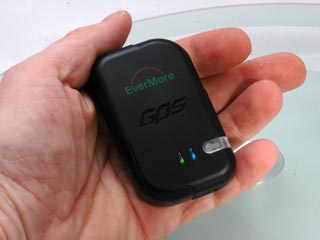
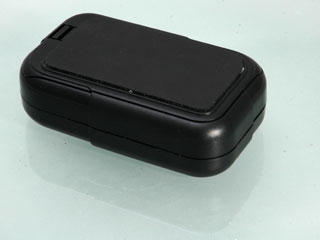
Lets take a look at the EverMore 800BT device. As you can see from the picture to the right it is a small device fitting snuggly into the palm of your hand. |
|
On the top of the datalogger is the on/off switch (clear plastic) and two indicator LEDs. To switch the datalogger on you have to press the button for 3 seconds or so. A good security mechanism to stop the GPS activating from a knock in your pocket or bag.
Once switched on the datalogger is activated on its own. The green LED will light solidly until the GPS achieves a fix when it will start to flash slowly. A fix is when the GPS has located the satellites and knows it's position.
The blue light on the right is the Bluetooth indicator. To activate Bluetooth just press the power button again and the bluetooth LED will light solidly. When a device is connected the LED will flash. |
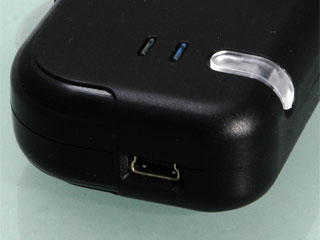 |
On the side of the GPS datalogger is a mini-USB connector. This is used to both charge the battery, and also transfer the datalog to your PC.
The manual claims that the supplied cable only transfers data between the datalogger and the PC. I have used other cables which appear to charge and transfer data.
Whilst the battery is charging the power switch is red. During normal use it will flash red as the power is getting low.
Whilst on the subject of things getting low, as the internal memory fills up the satellite LED will turn to orange. |
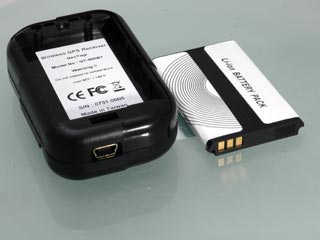 |
As with a lot of these devices the base of the GPS has a rubber finish. This is good for gripping a dashboard, but if your dashboard is just that little bit slippery then the included non-slip mat will prove to be useful.
I am fortunate and have a rough finish on my dashboard, and I have never experienced any movement.
The other included accessories are a car power supply and a mains power adapter. Both use the mini-USB cable to provide juice to the 800BT datalogger. Which makes the statement about not charging from a PC a little strange, unless there is some circuitry in there that stops it charging whilst downloading data. |
 |
Using the EverMore 800BT Datalogger
What is this GeoTagging all about? Put simply it is a method of working out where a photo was taken, and saving that information to be used in a location aware application such as Google Maps or Google Earth.
The GeoTagger software uses a feature of digital images called EXIF data. You don't need to understand this other than that EXIF provides some details about your pictures embedded within the image file. This records things like when the picture was taken, the camera it was taken on, the exposure etc.
There is a definition of the standard EXIF fields, and these can be used in determining when the picture was taken. There are also fields for location, but very few cameras have built in GPS. This is where the EverMore datalogger comes in. The datalogger records trackpoints which have a position and timestamp associated with them. Match the timestamp on the GPS to the camera's picture taken time and you can find out where the picture was taken, it really is as simple as that.
I was playing around with this sort of technology over 3 years ago, trying to match the timestamps of picture files to trackpoints it was a time consuming and somewhat error prone. At the time it worked well but required some dedication to the task.
Imagine my joy when Sony announced the CS1 a year ago, and then my disappointment when I found it only worked with specific Sony cameras...
The EverMore 800BT Datalogger and GeoTagger software fill the gap where Sony failed and provide a generic mechanism for Geo-referencing digital pictures.
Getting back on track (groan) again...
|
|
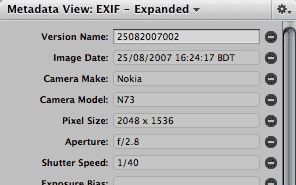
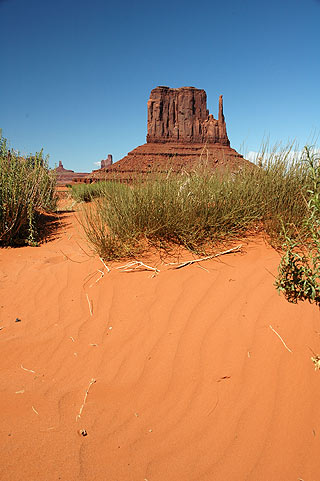
The first thing to do with the datalogger is to ensure that the date and time on the GPS (GMT) is in sync with the camera. As you cant change the GPS time then the camera needs to be adjusted. I have a habit of setting my cameras to GMT and not paying attention to daylight savings time. This means that the GPS and the camera should match perfectly.
Of course it is impossible for the Camera to keep time as accurately as the GPS's atomic clocks, even if you could set the camera in the first place...
I have managed to set mine to within a few seconds, and try to check and reset it every time I go out with the intention of serious picture taking. The golden rule as far as getting a good position recorded on the datalogger is to arrive at your location, wait for about 2 minutes and then take your pictures. When you have finished wait for a couple of minutes again before moving off.
The reason for this delay is twofold: Firstly it allows the GPS to settle down and get the strongest possible fix, Secondly it allows the differences in time between the GPS and the Camera to get better aligned. This allows a margin of error to be factored in to the later matching on your PC. I also like to use this time to check over my equipment, make sure I have the correct settings on my camera, and just think about what I want to picture and how I want to take it.
It is possible to take pictures whilst moving as long as you accept that there may be issues with placement. If you are traveling at 60mph when you take the picture then you could well be a mile or two out in your recorded position.
One of the things I noticed when using the 800BT was that it was not as quick as other devices to obtain a fix, but once it had acquired the satellites it kept them, even when traveling down some of the urban canyons in London. The same was true when entering and leaving shops and subways. The GPS lost its fix with no clear view of the sky, but within a few seconds of getting back out into the open again it was recording the track.
As a matter of habit I always check the GPS to make sure I have a green flashing light prior to setting my camera up.
|
Click to pictures to view larger images
|
The EverPhoto PhotoLogr Software Suite
OK so we have taken our wonderful images, now we need to get back to the digital workshop and process them...
As I have mentioned before in GPS datalogger reviews you can have the greatest hardware in the world, but it is no good without good quality software to help you analyse the results. this is where a number of these packages have been let down. Not so with the EverMore EverPhoto PhotoLogr software.
Evermore have carefully examined the workflow of digital photography and created an application that is tailored specifically to follow the process. They have also tried to make it as foolproof as possible (even I got it right) every step of the way.
When you connect the datalogger to the PC there is no fiddling around trying to work out what com port it connects to or what speed to set. The GPS is connected as an external data device so it looks like a disk drive. You can either use the data file on the GPS or as I do, copy it off onto the computer's hard drive.
You will also need to copy the camera pictures to a directory on the computer as well. I tend to copy both the pictures and the datalogger tracklog to a unique directory created in the PhotoLogr directory. For this example I have chosen Southend as the directory name.
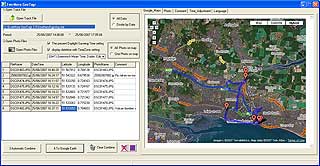
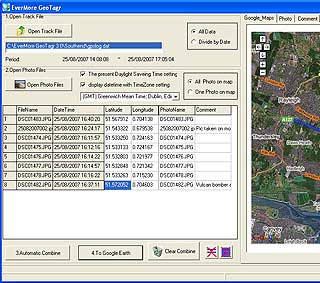
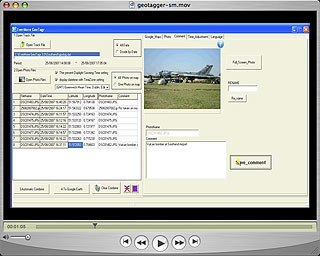
Now start the PhotoLogr. This provides a series of numbered steps for the workflow:
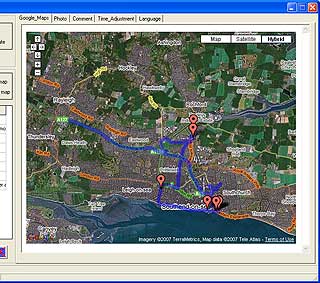
1) Open the tracklog file. this is the datalog.dat file copied from the GPS datalogger. This will show the track in the map window on the right in Google Maps. This will also set the start and end markers.
2) Open the photo images files. When you select the photos it will automatically combine the photos and the tracklog setting markers on the map for each matched image.
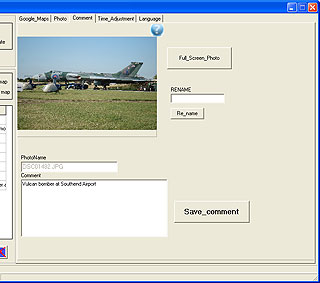
You can also now click on the Comments tab and either rename the image file or more importantly add a comment to the image. This is carried through to the Export files.
When you imported the images the system automatically matched the timestamp on the image to the tracklog, and creating position information where it is available.
You can use the google maps tab to move around your images and examine the image markers and the data stored in them. Once you have created comments for each image and ensured that you are happy with the results you can click on:
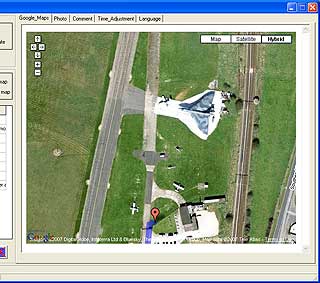
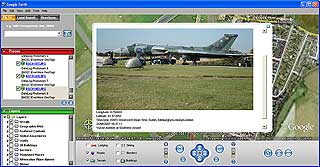
4: To Google Earth... This creates a Google Earth file and starts the Google Earth application. Once loaded you are zoomed into the entire track. From there you can move around the application windows and checkout the images compared with the Satellite images in Google Earth.
The way the Google Earth interface has been implemented presents the start, end, images and track as individual objects. This means that you can individually turn sections of the file on and off. |
Click here for a demo of the PhotoLogr software |
An undocumented feature of the PhotoLogr software is the generation of a microwebsite with an index of images linked to image detail pages, which in turn have individual links to Google Earth. Although these are basic web pages, they do provide a framework which to create a more professional looking portal for your creative talents.
So far so good, but what if I now want to take my geo-referenced images into another application. I use Aperture on my Mac which has great image management capabilities, including metadata control information using EXIF data fields. Unfortunately the PhotoLogr application does not update the EXIF data (which includes location data) in the image files. This would have been the icing on the cake for me, as more and more multimedia applications are being able to use this data.
|
Conclusions
One of the little pleasures in life for me is to bring my various hobbies together one way or another. The thread that links driving, cycling, walking, diving and photography is GPS. Location data is used and in most cases crucial to the safe execution of a lot of these activities, but with photography the added location information allows me to share my images in a manner never before envisaged.
The EverMore 800BT datalogger and PhotoLogr software does what I could only dream of a few years ago. There are a few minor things I would like to see changed or added, but overall this is a product I would recommend to any budding photographer. It's potential applications are huge, from Estate Agents, to House hunters, but for me the biggest appeal is for sharing your travels with friends around the world.
With many millions of digital cameras in the world, and even more mobile phones with inbuilt cameras I can see this sort of technology having a big impact in the near future. |
|
|
|
 |
 |
 |
 |
|
|