 Reviewed by Darren Griffin Reviewed by Darren Griffin
Carcomm Part Number: CMPC-76
Introduction
We have reviewed Carcomm products many times in the past and have never failed to be impressed by their quality and construction. For those of you unfamiliar with the name, Carcomm are a Dutch manufacturer who produce a wide range of hands-free car kits, mobile phone cradles and PDA mounts.
I have looked at an XDA PocketPC Cradle, a cradle for the TomTom x20 PND and now I have the opportunity to review a phone cradle for the Blackberry 8000. If you are wondering why this may be of interest to readers of PocketGPSWorld.Com, the Blackberry 8800 has a built-in SiRFStarIII GPS Chipset and comes bundled with Blackberry Maps and Google Maps, both of which make use of the GPS for positioning data. There is also an ever increasing range of third party applications such as Trimble Outdoors and Wayfinder Navigator to name but a few.
For handheld use all works perfectly well but if you wish to use any of the navigation solutions on your 8800 in-car then you need a cradle. And you will also quickly discover that the battery will require a recharge very quickly when the screen is constantly on and the GPS active!
So Carcomm's Blackberry 8800 cradle ticks all the boxes, it allows you to secure your handset in a position from where you can view it when behind the wheel and also ensures it remains constantly charged, not only useful for in-car use but means it is always topped up with juice from when you're away from power
So let's take a closer look and see what we think.
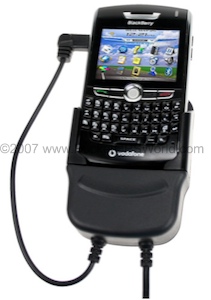
Blackberry 8800 Cradle
Solution
as with the other Carcomm cradles that we have reviewed, construction is much more akin to the OEM phone cradles you see in modern cars and in the options list than the cheaper cradles normally available for such devices. The cradle is manufactured from ABS plastic and consists of the cradle, a separate swivel mount, a gooseneck window suction mount and a self adhesive disc to allow the window mount to be affixed to a dashboard or other surface.
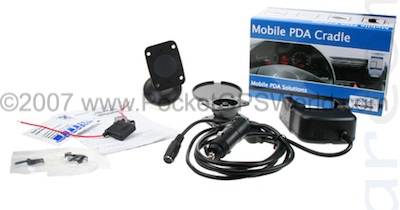
Box Contents
Out of the box this gives you a number of mounting possibilities, you can affix the cradle and swivel mount using the supplied screws direct to a suitable place on your dashboard, or using the gooseneck mount you can affix to the windscreen or you can use the self adhesive disc on the dash and again use the gooseneck mount.
Ideally though, we would recommend you use a dash clip to install your cradle. These clips are car specific plastic mounts that clip onto the dashboard (no holes need to be drilled) and to which the cradle and swivel mount are then attached.
This allows for a much neater and more discrete installation away from the windscreen. There are even optional click-on adapters (Part Number: CSC-007) that allow you to attach and remove the cradle from the clip thus ensuring nothing is left in-car to attract the attention of thieves.
A Range of Safety Clips
The cradle itself contains the electronics necessary to reduce the charge voltage from the vehicles 12/24v supply to the 5v required by the Blackberry's USB port. This is a huge advantage for anyone wishing to hard-wire the cradle into the vehicle (and the 12/24v compatibility is important for HGV drivers and other owners of vehicles with 24v electrical systems).
The cradle comes fitted with a cigarette lighter plug for immediate use but if you wish to hard-wire all you need do is chop off the plug and connect to a suitable fused electrical feed. Carcomm even supply an in-line blade fuse for this very purpose. This power cable is split mid way along its length, on one is a cigarette lighter plug for power and on the other is a PS/2 Female connector.
This connector allows you to charge another device using an optional cable such as a Bluetooth GPS, an bother phone or indeed anything which requires a 5v supply. Carcomm manufacture a selection of adapter cables for use with this facility.
Installation
If you want to get up and running straight away, all you need do is connect the cradle directly to the gooseneck mount with the supplied nuts and bolts, affix to windscreen and plug in. The blackberry simply drops in to the cradle where it is gently held. Power is supplied by a USB fly lead that connects to the side of the 8800. Why phone and PDA manufacturers insist on placing the USB/charge sockets in such places escapes me, it is clear that the phone designers gave no thought to a docking solution, perhaps excusable on a PDA but not on a phone such as this. However this is not the fault of Carcomm.
If you want a more permanent install then you need to decide where you wish to install the cradle. As I mentioned earlier, Carcomm have a range of ABS plastic no-holes mounting brackets that attach to existing fittings as well as metal dash-mounts that screw to the dashboard or fit behind radio head-units etc.
With a suitable mounting location you can affix the cradle using the supplied swivel bracket and then either connect to your cigarette lighter or accessory socket or hard-wire as desired.
In Use
It works well, the cradle holds the 8800 sufficiently securely that it does not move when in place but still allows easy insertion/removal. The power fly lead is just the right length and is a right-angled type so looks neater when attached to the Blackberry.
Because I had no need of the additional charge facility and because the power lead was a very generous length I chose to chop the cable back and re-attach the cigarette lighter plug. Normally I would have hard-wired the cradle but as I review many different devices the clips attached to my cars dashboard have quick removal fittings that allow me to install a new cradle easily. So for me, a less permanent install was required.
Conclusion
I like smart simple solutions and Carcomm's latest cradle is once again just that. It looks great and offers excellent value. Carcomm's products are quality items and they would not look out of place in a luxury car.
The only grievance I have is one that is not of Carcomm's making and that is the side mounted USB/charging port on the 8800. I would much prefer the USB port had been located on the bottom of the handset and then the 8800 could have simple been dropped into the cradle where it would have mated with the power automatically. But that issue aside I have no hesitation in recommending this cradle.
Review Cradle Supplied By:

|